
 MX Channel System
 MX-R Roof Support
 Supports & Suspensions
 Fixings & Anchors
 Pipework Products
 Cable Containment
 Threaded Fasteners
 Screws & Rivets
 View all...
 Design, Engineering & Fabrication
 Fire Resistant Supports


MX channel brackets for M&E supports
Browse MIDFIX MX channel brackets by connection role. The range includes angle, flat and U brackets, base plates, Z brackets, framing parts, splices and beam clamps. Open the selected product record for its options, dimensions, finish and available data sheet. Start with the MX Tested Channel System page or browse the MX product family.




Match the bracket to the issued detail
Start with the bracket and connection shown on the issued support drawing. Use the exact product code and option in the schedule. Open a category card to view product details and any available data sheet. Check the item information against the assembly before selecting a part.
Flat plates and flat brackets
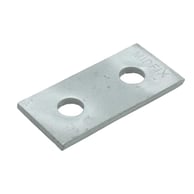
Channel plates include FB098, FB099/10, FB100 and FB101 BZP, with a separate FB101 Hot Dip Galvanised option. FB102, FB103, FB104 and FB105 are flat connections with two, three, four and five holes. FB107 is an angle form, FB108 a tee, FB109 a cross, and FB110 a tee connection. Plate options have Bright Zinc Plated or zinc-plated finishes; bracket options have Hot Dip Galvanised finishes. Check the finish on the exact item.
Angle, U and Z brackets
The AB range covers 90° channel connections, left-hand and right-hand versions, external and internal 45° forms, and a hinged variable-angle bracket. AB200 measures 57 x 47 mm and has a 1 + 1 hole arrangement. AB216 and AB217 are the left-hand and right-hand versions; AB218 and AB219 are the external and internal 45° forms; AB222 is hinged. AB brackets have Hot Dip Galvanised finishes.
The UB400, UB401, UB402 and UB403 have U-bracket depths of 21 mm, 41 mm, 41 x 82 mm and 82 mm. The ZB300, ZB301 and ZB302 have Z-bracket depths of 21 mm, 41 mm and 82 mm. U and Z brackets have Hot Dip Galvanised finishes. Use the exact MX option shown on the issued detail.
Framing parts, splices and base plates
The framing range includes SB801 three-way, SB802 two-way and SB804 corner brackets, the SB803 C bracket for threaded-rod suspensions, and SB805, SB806 and SB807 L, T and crossover forms. Framing brackets have Hot Dip Galvanised finishes. The illustrated SB801, SB802 and SB804 connections use MX HS/HP41 channel; use those details only for the named product.
The SP500 internal splice is for 21 mm and 41 mm channel and includes four M6 machine screws. The splice is pre-galvanised and its locking screws are electro zinc plated. The SP501/41 external splice is for 41 mm channel, uses set screws with channel nuts and has a Hot Dip Galvanised finish.
For base plates, FP601 has one 14 mm fixing hole for single 41 mm channel. FP602 has two 14 mm fixing holes for double channel. The FP603/41 and FP603/82 are gusseted versions with two fixing holes. FP604/41 and FP604/82 use a welded double socket and have multiple fixing options. Base plates have Hot Dip Galvanised finishes.
Beam clamps and connection parts
The category also includes BC700, BC701, BC703, BC705, BC706 and BC707. Their product details distinguish the channel option and connection parts; beam clamps have Hot Dip Galvanised finishes. BC701 is supplied with a U-bolt; BC703 and BC706 use channel nuts and set screws. Check each product against the exact channel section and fixing detail on the drawing. Use the MX channel sections and MX channel nuts categories to find the named parts.
Check the complete support
Before selecting a bracket, check the span and design load, channel profile and orientation, fittings and channel nuts, beam clamp and fixings where specified, supporting structure and substrate, and site and installation conditions. Follow the issued design and the information for the exact products and connection. Do not transfer a detail from a different bracket or assembly. If an item, fixing or condition is unclear, ask the responsible designer or MIDFIX to review it before specifying or fitting the parts.
Use the MX Technical Handbook with the issued design and product data. Confirm the Handbook issue that applies to the project before using its technical detail. For installation learning, follow the MX channel system training route. The dynaMX online bracket configurator opens at a MIDFIX sign-in page; check access and design scope for the project. Send the product codes and drawing through the MIDFIX enquiry route if the published details do not answer the selection question.